We should consider every day lost on which we have not danced at least once.
Friedrich Nietzsche
Inspired by this sentence, I embarked on a year-long project in 2019 where I aimed to capture at least one photo each day using my camera. While all these photos are stored on my drive, I’ve always been curious about the number of days I might have missed and how many photos I took. As I was learning how to create radar charts, it struck me that visualizing the timestamps of these photos could be nice.
Today, I utilized R to extract the metadata from all the images on my drive. Here’s what I obtained:
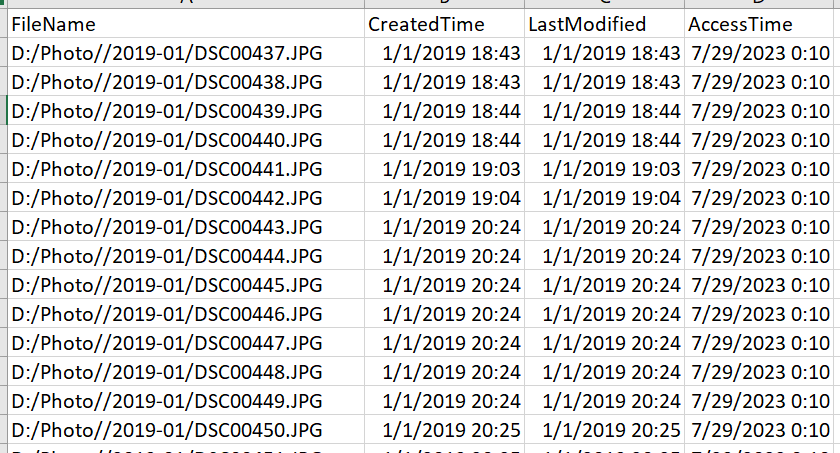
Tomorrow, I would like to create a radar chart with it. The R code is below if you also have the same needs. 🙂
library(tidyverse)

# Step 1: List all directories starting with "2019"
root_directory <- "D:/Photo/"  # Replace with your folder path
all_dirs <- list.dirs(path = root_directory, full.names = TRUE, recursive = FALSE)

# Filter directories starting with "2019"
dirs_2019 <- all_dirs[grep("^2019", basename(all_dirs))]

print(dirs_2019)

# Step 2: For each directory, get the photo information
photo_data <- lapply(dirs_2019, function(dir_path) {
  photo_files <- list.files(path = dir_path, pattern = "\\.(jpg|jpeg|png|bmp|tiff)$", full.names = TRUE, ignore.case = TRUE)
  if(length(photo_files) > 0) {
    file_info <- file.info(photo_files)
    return(data.frame(
      FileName = rownames(file_info),
      CreatedTime = file_info$ctime,
      LastModified = file_info$mtime,
      AccessTime = file_info$atime
    ))
  } else {
    return(data.frame( FileName = character(), CreatedTime = as.POSIXct(character()), LastModified = as.POSIXct(character()), AccessTime = as.POSIXct(character())))
  }
})

# Combine all data frames into one
photo_data_combined <- bind_rows(photo_data) %>%
  filter(startsWith(format(CreatedTime, "%Y-%m-%d %H:%M:%S"), "2019"))

# get the directory of the current .R file so that I can save the csv file in the same directory.
# Only can do in RStudio
if (requireNamespace("rstudioapi", quietly = TRUE)) {
  script_path <- rstudioapi::getSourceEditorContext()$path
  print(script_path)
  dir_only <- sub("/[^/]+$", "", script_path)
  setwd(dir_only)
}

write.csv(photo_data_combined, file = "./photos2019.csv", row.names = FALSE) Qichun Dai